Support

One inbox for the AI agent and your team.

Website chat and email arrive in one place. The agent answers what it can, and when someone needs a person, the team joins with the whole story in front of them.

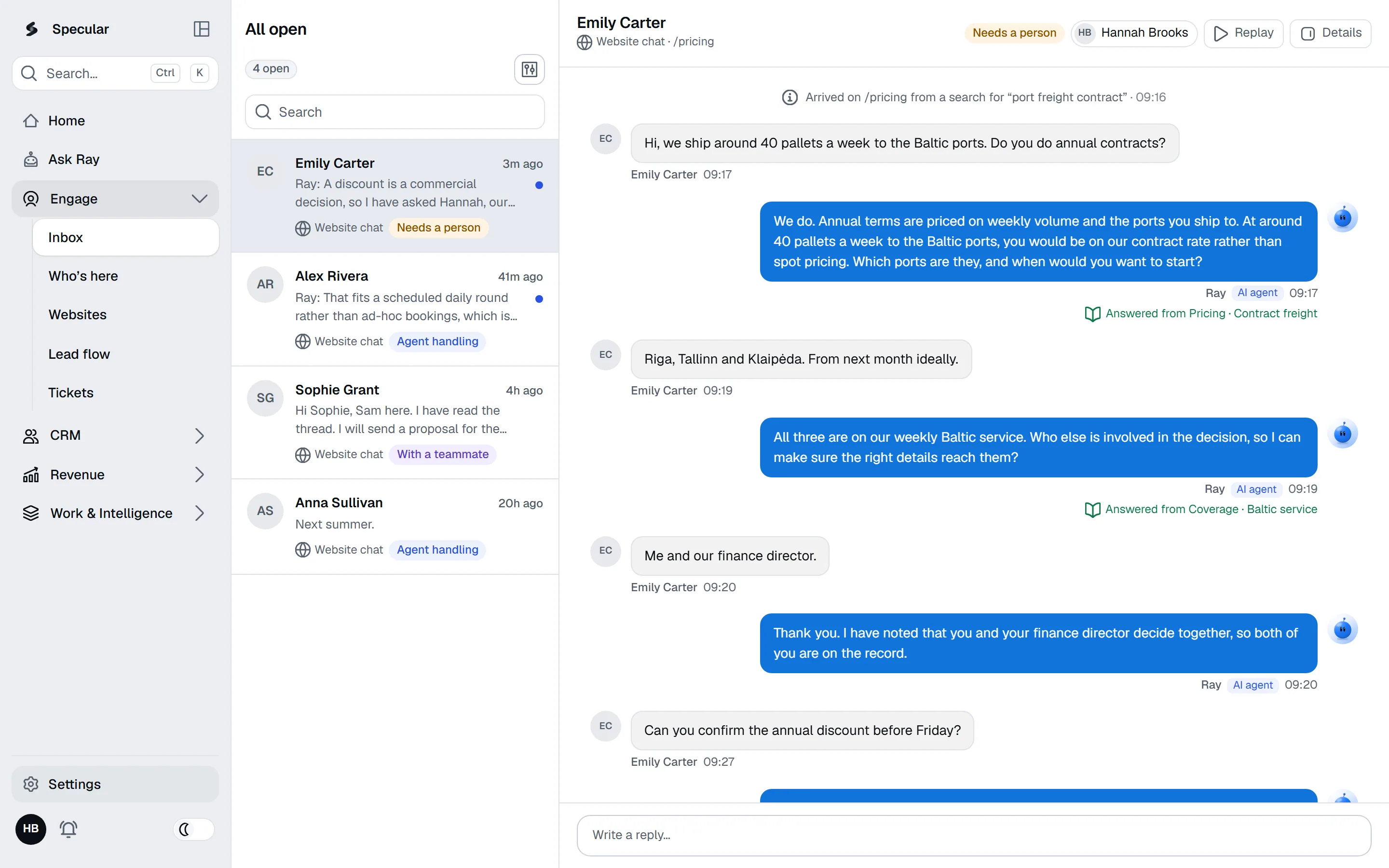
The inbox: views on the left, open conversations in the middle, and a conversation where the AI agent has handed a customer to the team.
Answered first by AI The agent replies from your own knowledge, around the clock.Shared inbox
Handed over cleanly When a person is needed, the team gets a brief, not a puzzle.Shared inbox
Worked as a team Assign, follow, send later, merge and note, without stepping on toes.Shared inbox

Shared inbox

What shared inbox does for you

Every conversation in one place, with the AI agent and your team side by side.

The agent knows when to bring in a person.

A customer who asks for a person, or a question the agent should not answer, lands in Needs a person with what was said and what is left to do.

  • Join now takes over and stops the agent replying
  • First in line and how long they have waited, shown on the conversation
  • The handoff brief says what the customer needs
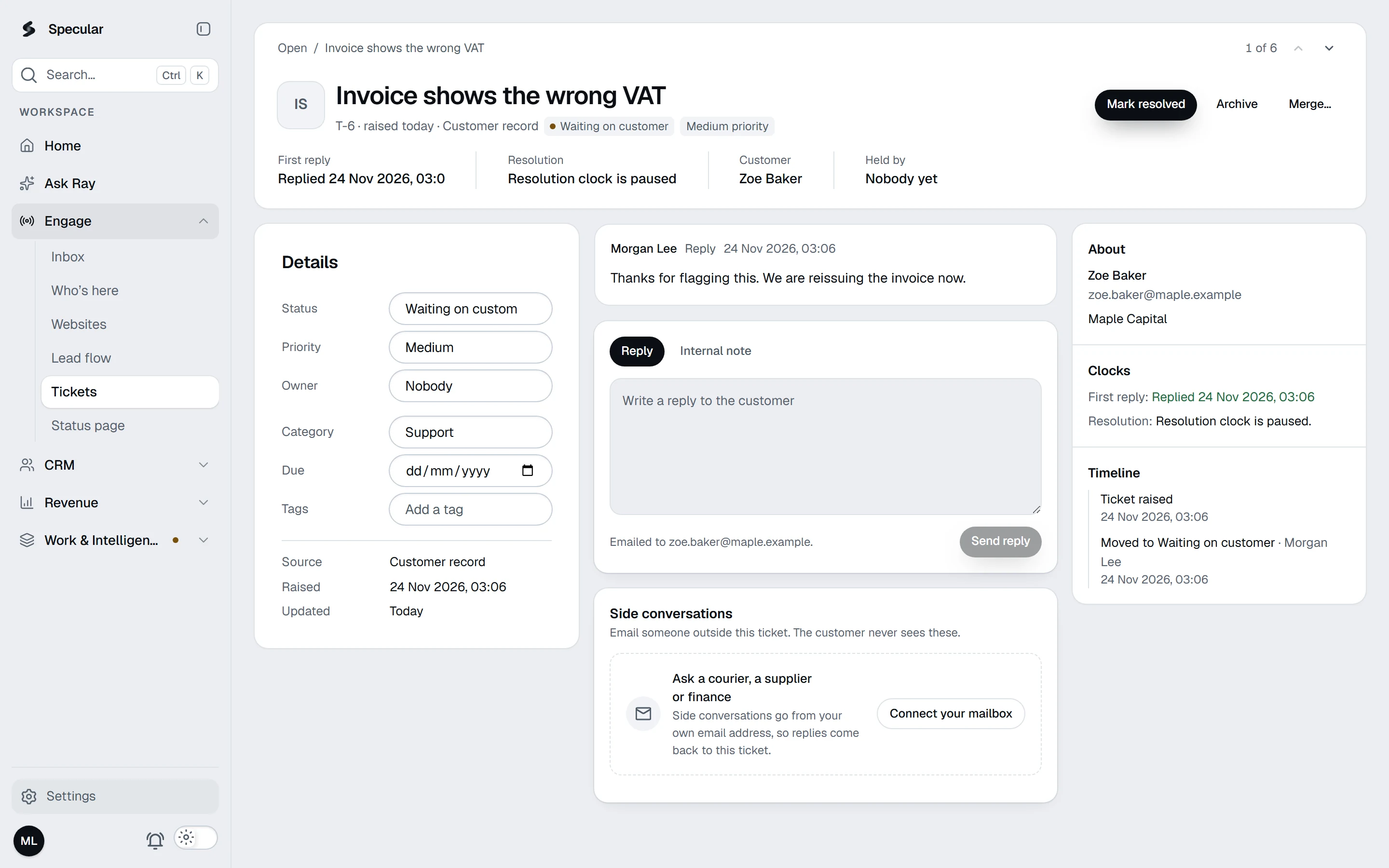
Follow, send later, and merge the duplicates.

Follow a conversation someone else holds, schedule a reply for the morning, set yourself a reminder, and merge a customer's second message into the first.

  • Followers hear about new messages, never their own
  • Replies sent later go out as you, by the right channel
  • Merged conversations point to where they went

Inside the product

Shared inbox, screen by screen

The real screens, as your team uses them.

The agent knows when to bring in a person.

A customer who asks for a person, or a question the agent should not answer, lands in Needs a person with what was said and what is left to do.

The agent knows when to bring in a person.

Through the inbox

Every conversation, from first message to resolved.

Who handles each stage, in one shared inbox.

  1. VisitorArrivesFrom your website widget.
  2. AI agentAnswered firstBy the AI agent.
  3. SpecularAssignedTo someone with the skill and time.
  4. Your teamWorked togetherNotes, follows, send later.
  5. Your teamResolvedOr merged with its duplicate.

What changes

What shared inbox changes for your team

Nothing answered twice, nothing missed

Assignment, notes and follows in one place.

Faster replies

The agent answers first; your team takes what needs a person.

No surprise bills

Conversations your team answers are never counted or charged.

How it works

Set it up in three steps

Each step has a guide with the exact screens and buttons.

The inbox: views on the left, open conversations in the middle, and a conversation where the AI agent has handed a customer to the team.

Why Specular

Why teams choose Specular

What comes with every workspace, whichever feature brought you here.

  • An AI agent includedIt answers on your website on every plan, from your own content.
  • Your team's conversations are freeConversations people answer are never counted or charged.
  • A CRM includedCustomers, deals and tickets in the same workspace, not another tool.
  • Live in an afternoonOne script tag, and step-by-step guides for every screen.

Pricing

Plans and pricing

Conversations your team answers are unlimited on every plan, including the free one. Every AI capability has a monthly allowance you can read before you pay.

Billing period
Free forever

Free

Put an agent on one website and see what it does.

$0/ month

On your own AI key. No card needed.

Start free
Websites
1
External AI credits
Your own AI key
File storage
100 MB
Team users
1
Customer profiles
1,000
AI agents
1

Includes

  • AI answers
  • Website crawling
  • Website chat
  • Shared inbox
  • Handoff to a person
  • Customers and companies
  • Roles
  • Website widget
and 9 more in the comparison

One site, one person, your own AI key, and no card.

Small teams

Starter

For a small team answering real volume.

$23$29/ month

$276 billed yearly

Start with Starter
Websites
2
External AI credits
3,500about 230 conversations
File storage
2 GB
Team users
3
AI voice minutes
90 min
Customer profiles
10,000
AI agents
1

Everything in Free, plus

  • Documents
  • Agent copilot
  • Voice conversations
  • Qualification playbooks
  • Meeting booking
  • Google and Microsoft calendars
  • Leads and pipeline
  • Workflows
and 18 more in the comparison

A second website and room to grow into.

Most popular

Growth

More AI, more people, lead scoring and insights.

$79$99/ month

$948 billed yearly

Choose Growth
Websites
10
External AI credits
11,500about 760 conversations
File storage
10 GB
Team users
10
AI voice minutes
250 min
Customer profiles
100,000
AI agents
5

Everything in Starter, plus

  • Lead scoring
  • Knowledge gaps
  • Insights
  • Ticket workspace
  • Reply-time targets
  • Intent and journey stage
  • Priority support
  • Experience results
and 2 more in the comparison

Teams whose agent is answering every day.

Save 20%

Pro

The most AI included, with the API, webhooks and traces.

$160$200/ month

$1,920 billed yearly

Choose Pro
Websites
Unlimited
External AI credits
30,500about 2,000 conversations
File storage
30 GB
Team users
25
AI voice minutes
500 min
Customer profiles
500,000
AI agents
Unlimited

Everything in Growth, plus

  • Public API
  • Webhooks
  • Traces
  • Custom roles

Multi-site operations that run on this daily.

Enterprise

Your own model key, your own allowances, your own terms.

Procurement, compliance, and volume that needs a conversation.

  • Bring your own model key
  • AI allowances set to your volume
  • A price agreed with you
Talk to sales

Going past an allowance never cuts a visitor off mid-conversation. On paid plans, extra usage draws on prepaid credit ($10, $25, $100 packs that never expire), never an open-ended bill. Free runs its AI on your own provider key. Nothing is charged per lead or per meeting.

Questions

Good to know.

Plans The shared inbox is on every plan, and conversations your team handles are never capped or charged per conversation. See pricing

Which channels arrive in the inbox?

Website chat and email from a connected mailbox, in one list with their own threads. Read the guide

Can the AI agent and a person both answer the same customer?

Yes, one at a time. When someone joins, the agent stops replying until they hand it back. Read the guide

Is there a limit on conversations my team handles?

No. Human conversations are never capped and never charged per conversation. Read the guide

Can I schedule a reply?

Yes. Send later sends your reply at the time you choose, up to 90 days ahead. Read the guide

Which plans include it?

The shared inbox is on every plan, and conversations your team handles are never capped or charged per conversation.

How quickly can we set it up?

In three steps, each with a guide that shows the exact screens: 1. Put the widget on your site. 2. Decide when a person joins. 3. Work the inbox together. Read the guide

Does it work with the rest of Specular?

Yes. It shares the same customers and records as Tickets, Skills and language routing and Ask Ray, so nothing is copied between tools.

Works with

Tickets

Work that takes longer than a chat, with clocks, owners and internal notes.

Ask Ray

The AI assistant for your team: answers questions and completes tasks across Specular.

Start free with Specular

Start free on your own AI key, or talk to Ray first and see how it feels.

Try Ray
  • Ray
  • Onyx
  • Echo
  • Scout
  • Kip
  • Prism
  • Summit
  • Halo
  • Parley
  • Nimbus