
Ray, the AI assistant

The AI assistant that works inside your Specular workspace

Ask Ray in plain English to find a customer, follow up a deal, set up a status page or chart your pipeline. It uses your permissions, and asks you to confirm anything risky before it happens.

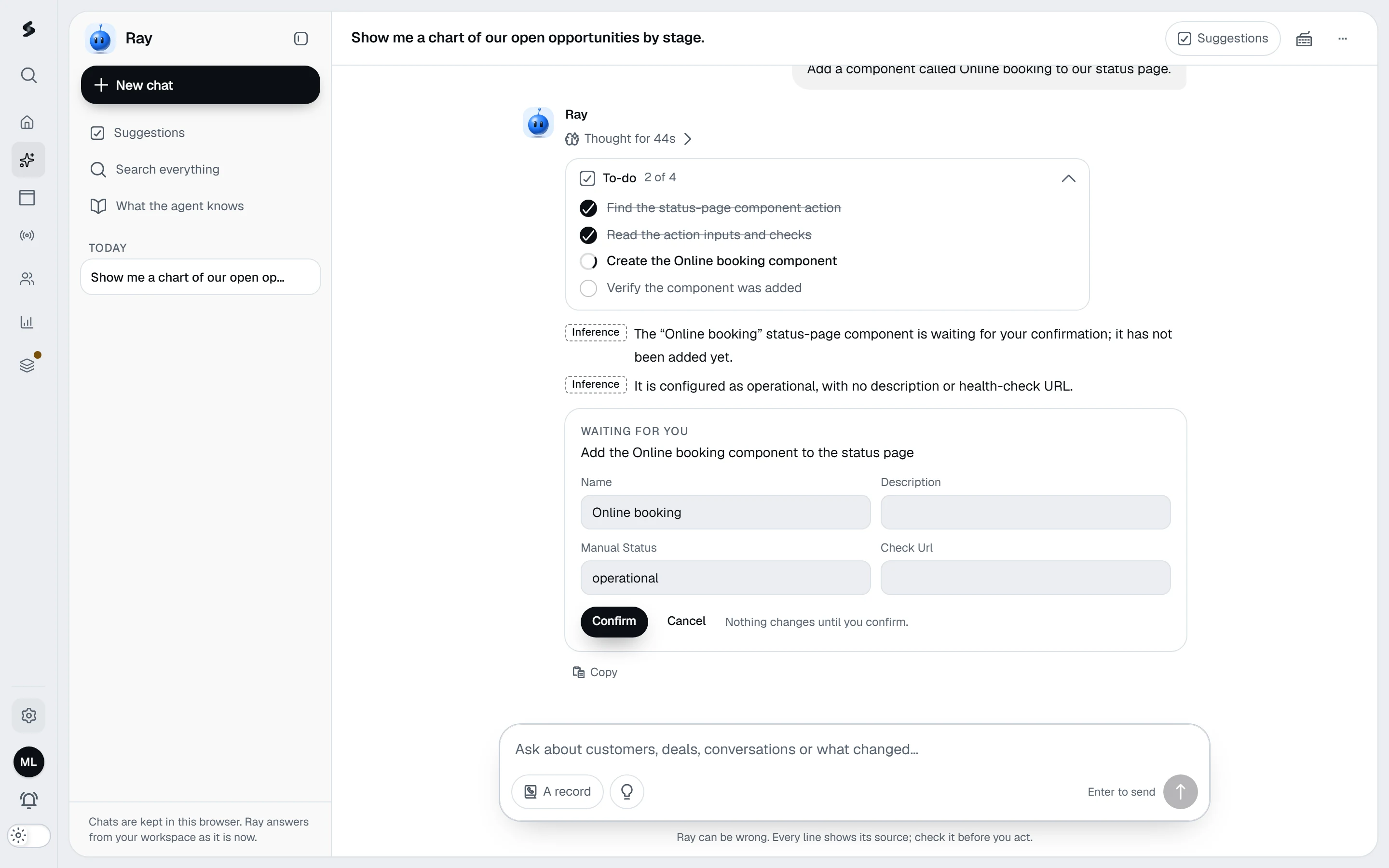
Ray in Specular: its plan for a status page change ticked off step by step, and the change waiting on a card to confirm.

Definition

What is Ray?

Ray is an AI assistant built into Specular. It can read and change what you can: customers, deals, conversations, tickets, websites, automations, reports and settings. You ask in plain English, and Ray runs the same actions the screens run.

Where it works
Its own page, every record, and the inbox
What it can do
More than 750 actions across the app
Whose access
Yours, checked on every action
Risky changes
Wait for you to confirm
Plans
Every plan, from the workspace's AI credit
Other assistants
ChatGPT and Claude can use the same tools
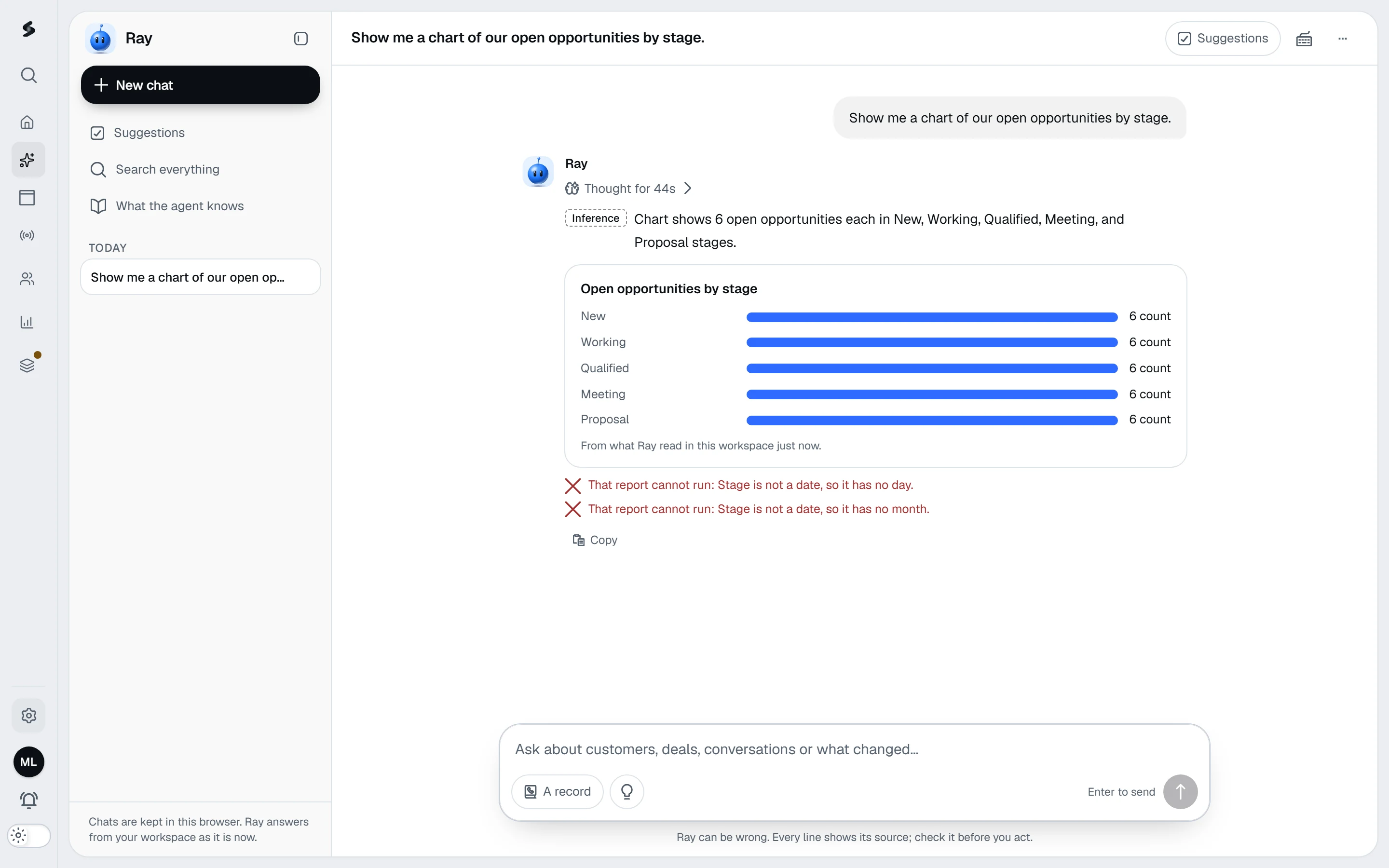
Ray answering with a chart of open opportunities by stage, drawn from the workspace.

How it works

How does Ray complete a task?

Ray plans the task, finds the action that does it, checks it has every value it needs, and only then makes the change or asks you to confirm it.

  1. Your teamYou askIn plain English.
  2. AI agentRay finds the actionOut of 750+.
  3. AI agentRay checksEvery value it needs.
  4. Your teamYou confirmRisky changes only.
  5. AI agentRay records itWith who asked.

Coverage

What can Ray do in Specular?

Ray can use more than 750 of the app's actions, with the same checks the screens apply.

  • Customers and dealsFind, update, add tasks and notes.
  • Inbox and ticketsRead, assign, follow up.
  • Websites and agentsAdd a site, teach the agent.
Ray
  • AutomationsDraft, adjust, check runs.
  • ReportsAnswers as tables and charts.
  • SetupFields, views, products, status page.

By team

How does Ray help each team?

The same assistant, asked for different work.

  • Sales

    Lists the deals that have gone quiet, adds the follow-up tasks and charts the pipeline by stage.

  • Customer service

    Updates the status page, follows up tickets and adds answers to what the website agent knows.

  • Admins

    Adds fields, views, products and teams, and drafts automations, without hunting through settings.

Confirmation

How do risky changes work?

Ray shows its plan as it works, then puts the change on a card. You can edit any value on the card, and nothing happens until you press Confirm.

  • Money, access, deletions, sending and publishing
  • Values you can edit before confirming
  • A refused value can be fixed and confirmed again
Ray's plan for adding a status page component, ticked off step by step, and the change on a card with Confirm and Cancel.

Daily briefing

What is in Ray's morning briefing?

At 8am in your workspace's time zone, Ray lists what needs you today. Each line links to the record, and only real items appear.

  1. 8:00 The briefing arrivesOn Home and in notifications.
  2. Deals Follow-ups dueOpportunities with no recent activity.
  3. Customers Replies near deadlineConversations close to their target.
  4. Tasks Due or overdueAssigned to you.
  5. Automations Failed runsWith a link to the run.

Security

How does Ray keep your data safe?

Ray follows the same rules as the person asking, and they are checked again on every action.

  1. 01Your permissionsRay sees and changes only what your role allows, in your workspace.
  2. 02Your confirmationChanges to money, access, deletions, and anything sent or published wait for you.
  3. 03An audit recordEvery change is recorded as Ray's, with who asked, when, and the request.
  4. 04No secretsPasswords, keys and tokens are out of Ray's reach and never appear in answers.

ChatGPT and Claude

How do I connect ChatGPT or Claude to Specular?

Add Specular as a custom connector and sign in. The assistant then uses Ray's tools with your permissions, and risky changes still wait for you in Specular.

  1. Your teamAdd the addressAs a custom connector.
  2. Your teamSign inWith your Specular account.
  3. Your teamPick a workspaceAnd allow access.
  4. AI agentAsk in the assistantIt uses Ray's tools.

Connector address

https://hispecular.com/api/v1/mcp

Works with ChatGPT and Claude custom connectors, and any MCP client that signs in with OAuth. Disconnect it any time in Settings, API.

Questions

Questions about Ray

What Ray can do, what it cannot, and how it follows your rules.

Still wondering about something?

Ask Ray. It answers from this site, and says so when it does not know.

More than 750 actions across customers, deals, the inbox, tickets, websites and agents, knowledge, automations, reports, the status page and settings. It also answers questions about your workspace with tables and charts.

Pricing

Plans and pricing

Conversations your team answers are unlimited on every plan, including the free one. Every AI capability has a monthly allowance you can read before you pay.

Billing period
Free forever

Free

Put an agent on one website and see what it does.

$0/ month

On your own AI key. No card needed.

Start free
Websites
1
External AI credits
Your own AI key
File storage
100 MB
Team users
1
Customer profiles
1,000
AI agents
1

Includes

  • AI answers
  • Website crawling
  • Website chat
  • Shared inbox
  • Handoff to a person
  • Customers and companies
  • Roles
  • Website widget
and 9 more in the comparison

One site, one person, your own AI key, and no card.

Small teams

Starter

For a small team answering real volume.

$23$29/ month

$276 billed yearly

Start with Starter
Websites
2
External AI credits
3,500
File storage
2 GB
Team users
3
AI voice minutes
90 min
Customer profiles
10,000
AI agents
1

Everything in Free, plus

  • Documents
  • Agent copilot
  • Voice conversations
  • Qualification playbooks
  • Meeting booking
  • Google and Microsoft calendars
  • Leads and pipeline
  • Workflows
and 18 more in the comparison

A second website and room to grow into.

Most popular

Growth

More AI, more people, lead scoring and insights.

$79$99/ month

$948 billed yearly

Choose Growth
Websites
10
External AI credits
11,500
File storage
10 GB
Team users
10
AI voice minutes
250 min
Customer profiles
100,000
AI agents
5

Everything in Starter, plus

  • Lead scoring
  • Knowledge gaps
  • Insights
  • Ticket workspace
  • Reply-time targets
  • Intent and journey stage
  • Priority support
  • Experience results
and 2 more in the comparison

Teams whose agent is answering every day.

Save 20%

Pro

The most AI included, with the API, webhooks and traces.

$160$200/ month

$1,920 billed yearly

Choose Pro
Websites
Unlimited
External AI credits
30,500
File storage
30 GB
Team users
25
AI voice minutes
500 min
Customer profiles
500,000
AI agents
Unlimited

Everything in Growth, plus

  • Public API
  • Webhooks
  • Traces
  • Custom roles

Multi-site operations that run on this daily.

Enterprise

Your own model key, your own allowances, your own terms.

Procurement, compliance, and volume that needs a conversation.

  • Bring your own model key
  • AI allowances set to your volume
  • A price agreed with you
Talk to sales

Going past an allowance never cuts a visitor off mid-conversation. On paid plans, extra usage draws on prepaid credit ($10, $25, $100 packs that never expire), never an open-ended bill. Free runs its AI on your own provider key. Nothing is charged per lead or per meeting.

Start free with Specular

Start free on your own AI key, or talk to Ray first and see how it feels.

Try Ray
  • Ray
  • Onyx
  • Echo
  • Scout
  • Kip
  • Prism
  • Summit
  • Halo
  • Parley
  • Nimbus